

When I tested Microsoft’s new Gantt visual (preview) in Power BI, I liked where it was headed, but it couldn’t do what project controls reporting needs every week. It had no baselines, no today or data date line, no dependencies, and a 1,000-row limit. I wrote up the workarounds in a sample repo, but some gaps can’t be fixed with DAX. So I built my own visual.
Project Controls Gantt is now available for free on GitHub.
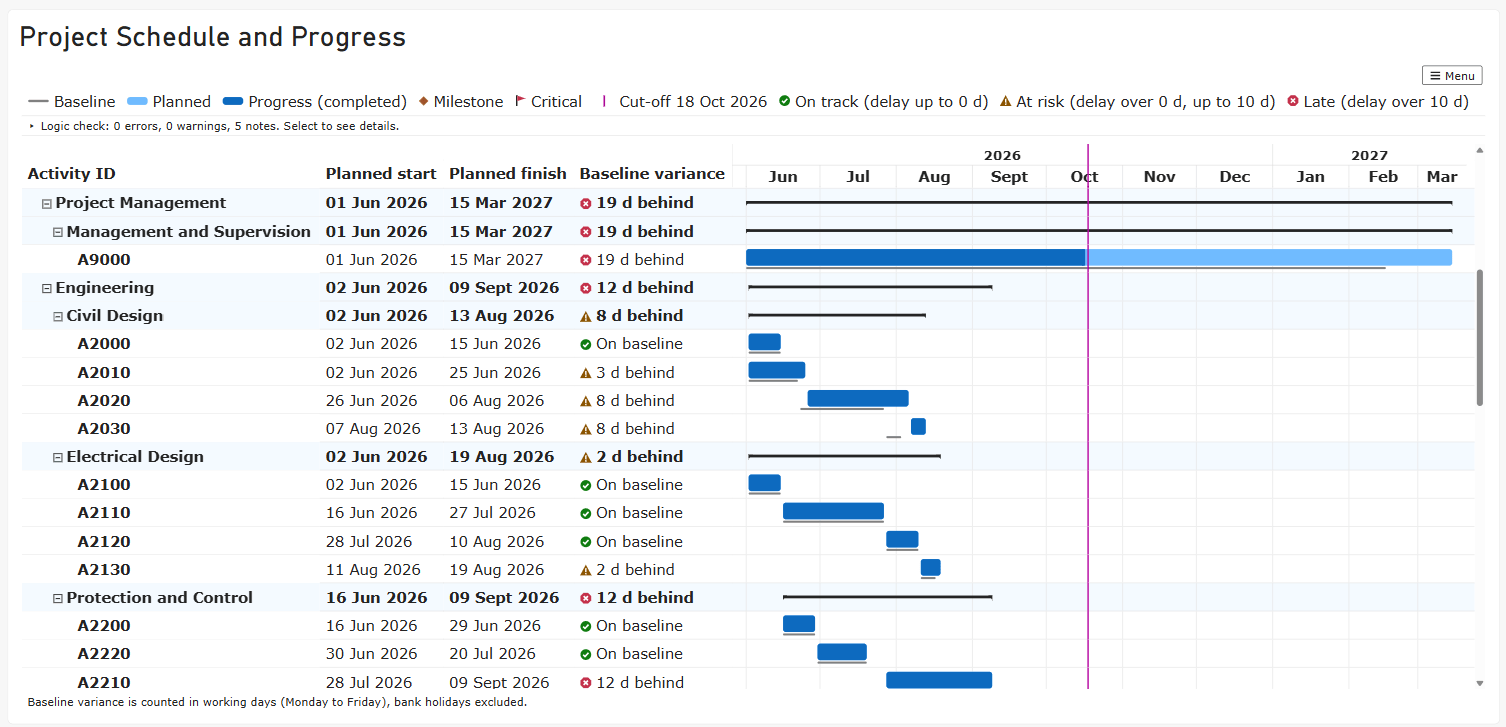
What it does
- Baselines and variance: a baseline bar under every task, and a variance column that flags each task as On track, At risk, or Late, using thresholds you set.
- Cut-off line: mark your data date. Planned dates before it count as actuals.
- Progress: percent complete fills each bar.
- Logic checks: finds missing and broken predecessor and successor links. Select any task to trace its links.
- Critical tasks and milestones: flags from total float, and diamonds for any activity type containing “Milestone”, with no DAX needed.
- Scale: up to 6 collapsible grouping levels and 30,000 rows.
- Accessible: the schedule is a real grid that works with the keyboard and screen readers, built to WCAG 2.2 AA.
It works with exports from Primavera P6, MS Project or any schedule table with one row per task.
Try it
- Download the
.pbivizand the sample report from the latest release. - Open the sample report to see it working on a demo substation upgrade schedule.
- Import the visual into your own report: Visualizations pane → ⋯ → Import a visual from a file.
The user manual covers every field and setting.
Free and open
The visual is free, and the source code is open under the MIT license. It collects no data and makes no network calls.
If you find a bug or have an idea, please open an issue. I’d love to hear how you use it.


